
Add and edit players
In Players you can add players, search and filter the list, and edit or delete player details.
Where to find this
In the left-hand menu, select Players.
Buttons at the top-right include: Reload, Export data, and Add player. Filter field options include: Name, Year of birth, Player ID, Join date, Family, Linked parent accounts, and Team. The list columns are: Name, Year of birth, Player ID, Join date, Family, Linked parent accounts, Team, and Actions.
How to add a player
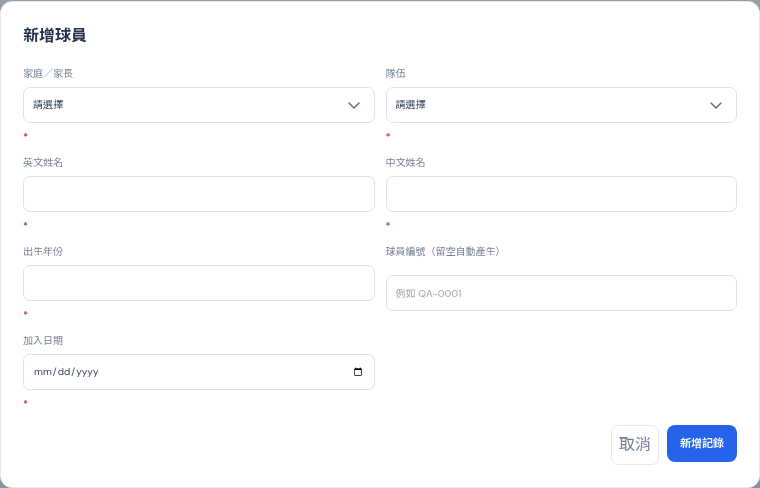
- Select Add player to open the Add player form.
- Fill in the following fields:
- Family / parent *: choose an existing family from the drop-down
- Team *: choose a class from the drop-down
- English name * and Chinese name *
- Year of birth * (a number)
- Player ID (leave blank to generate automatically): not required; the hint is for example QA-0001. If left blank, the system assigns a number automatically using the prefix in club settings
- Join date * (the on-screen date format is mm/dd/yyyy)
- Select Add record to finish, or Cancel to close without adding.
How to edit or delete a player
- Open the actions menu in that player's row. The only visible items are Edit and Delete.
- After you select Edit, the fields are the same as when adding, and are filled with the existing values. When editing, Player ID (leave blank to generate automatically) is marked required * (unlike when adding, when it is not required). Select Save changes to finish, or Cancel.
- A confirmation appears before you select Delete, for example: "Delete '……'? The data will be kept, and will only be hidden from the usual list." Confirm only if you want to delete; if you do not want to delete, cancel.
What you will see afterwards
After you add or save, the player appears in the list, showing the ID, family, linked parent accounts and team. After a deletion is confirmed, the row is hidden from the usual list, but the data is kept.
Please note
You need a family and a class first, so that the matching items are available in Family / parent and Team. Linked parent accounts in the list is the count of linked accounts, which is counted differently from Parent record count on the family page.