
Set fee generation and payment methods
In the Finance section of Club settings you can set when fees are generated each month, when payment reminders are sent, and which payment methods appear on receipts.
Where to find this
In the left-hand menu, select Club → Club settings, then open the Finance accordion. The description is: "Set fee generation, payment reminders and payment methods."
How to set this up
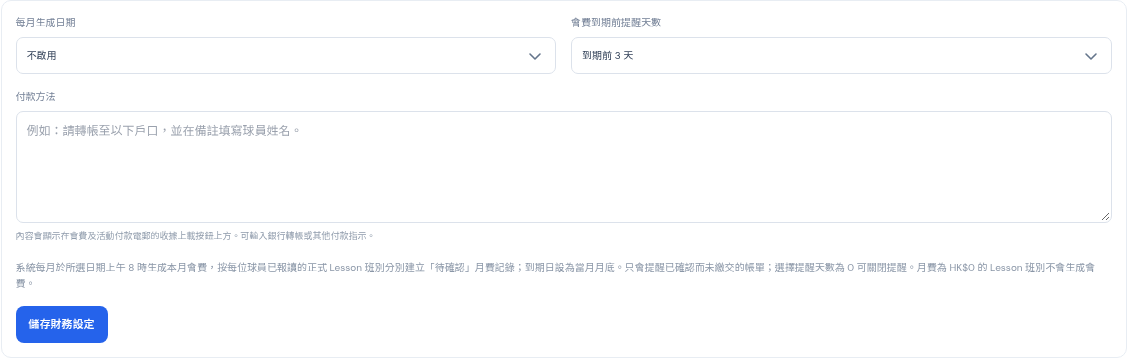
- In Monthly generation date, choose a date. The options are Disabled and the 1st to the 28th. If you do not need the system to generate fees automatically each month, leave this as Disabled.
- In Days to remind before fees are due, choose when reminders are sent. The options include Do not send reminders, and 1 to 30 days before the due date.
- In Payment methods, enter the instructions parents will see. This is a multi-line text field, with a hint such as: "Please transfer to the following account, and enter the player's name in the reference." The description is: "This text appears above the receipt upload button in fee and activity payment emails. You can enter bank transfer or other payment instructions."
- Select the blue Save finance settings button.
The full on-screen description is: "On the selected date each month at 8:00 am, the system generates this month's fees and creates a separate 'Pending confirmation' monthly fee record for each official Lesson class the player is enrolled in; the due date is set to the end of that month. Reminders are sent only for confirmed unpaid bills; choosing 0 reminder days turns reminders off. Lesson classes with a monthly fee of HK$0 do not generate fees."
What you will see afterwards
After you save, the fee generation date, reminder days and payment methods apply to later fee processes. If Monthly generation date is Disabled, the system will not generate this month's fees automatically.
Please note
Confirm that the generation date and reminder settings are correct before you select Save finance settings. After monthly generation is enabled, the system creates monthly fee records at 8:00 am on the selected date.