
Manage activity types
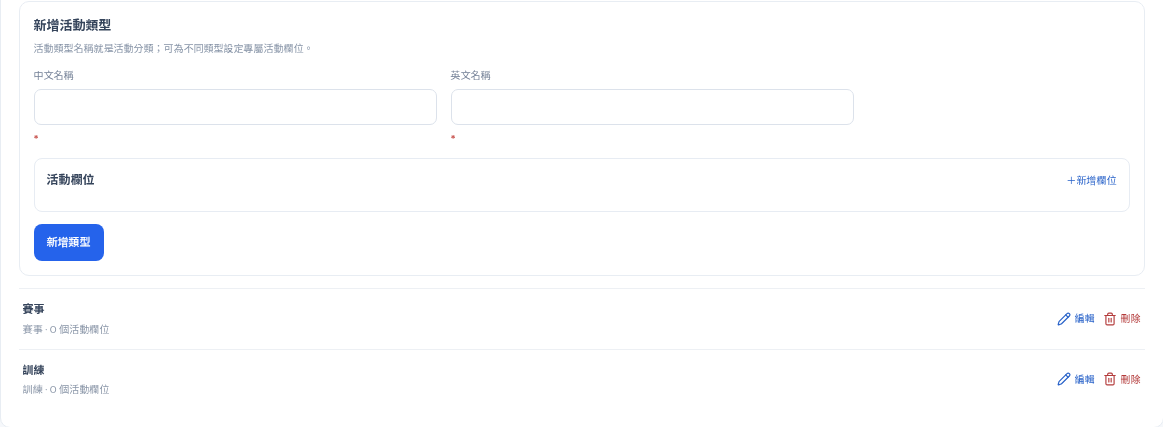
Activity types are categories for activities, such as Training or Matches. You can set Chinese and English names for each type, as well as type-specific activity fields.
Where to find this
In the left-hand menu, select Club → Club settings, then open the Activity types accordion.
How to add an activity type
- In the Add activity type section, fill in Chinese name and English name (both marked required *). The description is: "The activity type name is the activity category; you can set type-specific activity fields for different types."
- To add fields for this type, in Activity fields select + Add field, then fill in Chinese field name and English field name. If you do not need that field, you can select Remove.
- Select the blue Add type button.
How to edit or delete an activity type
- In an existing type row (for example Matches or Training), select Edit or Delete.
- When editing, the heading changes to Edit activity type, and the names are filled with the existing values. Select Save type to finish, or Cancel to discard the changes.
- A confirmation appears before deletion, for example: "Delete 'Matches'? Records will be kept, and will only be hidden from the usual list." Confirm only if you want to delete; if you do not want to delete, cancel.
What you will see afterwards
After you add or save, that type appears in the list and can be selected when you create an activity. After a deletion is confirmed, the type is hidden from the usual list, but the records are kept.
Please note
Deleting does not clear past activities as well; it only hides the type from the usual list. If you are not sure, select cancel.