
View fee records
In Finance you can view fee records, including unpaid, overdue and paid items. The parent screens are for looking up records; to make a payment, contact the club.
Where to find this
In the left-hand menu, select Finance. After you open it, the heading is Fee records.
How to view records
- The page description is: "Data is read from the club database; parents and players will only see records they are authorised to view."
- At the top you can switch between All, Unpaid, Overdue or Paid; the number of records in each status is shown beside the button.
- You can search records in "Search all fields..", or use Filter field and All values to filter. Select Clear to cancel the filter.
- To refresh, select the circular arrow button at the top-right.
- If there are currently no fee bills, the list shows No data yet, and the count for each status is 0.
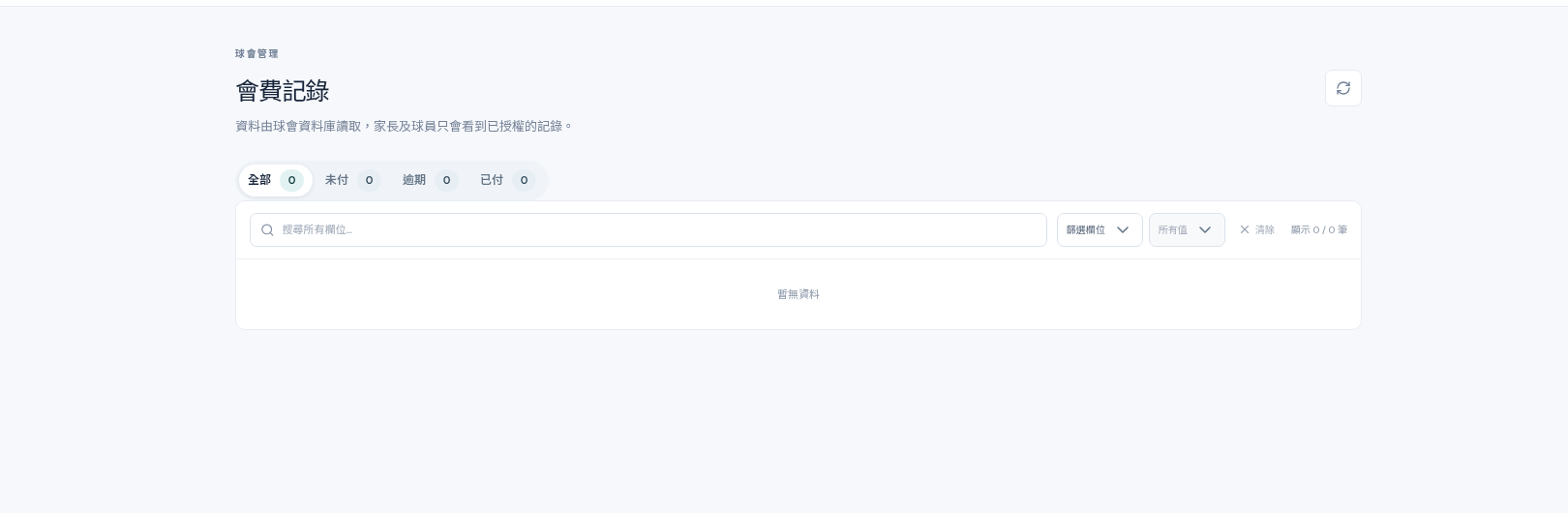
About this screenshot
This image was captured at about 12:33 on 23 November 2026 (Hong Kong time). If the interface was updated later the same day, this page was not captured again. Use this image as the reference for where functions appear and what the buttons are called.
You can also see the Fees receivable amount on the overview, which is a convenient way to check first whether any fees are outstanding.
What you will see afterwards
If there are bills, you can view their status in the matching tab. If it shows No data yet, there are currently no fee records to display. This page does not have an online payment button.
If you need to pay or query a bill
To pay fees, request a bill, or if you think an amount is incorrect, contact the club.