
View family and linked details
In Parents and families you can view the families you are authorised to see, parent contact details, and the number of linked players.
Where to find this
In the left-hand menu, select Parents and families.
How to view the family list
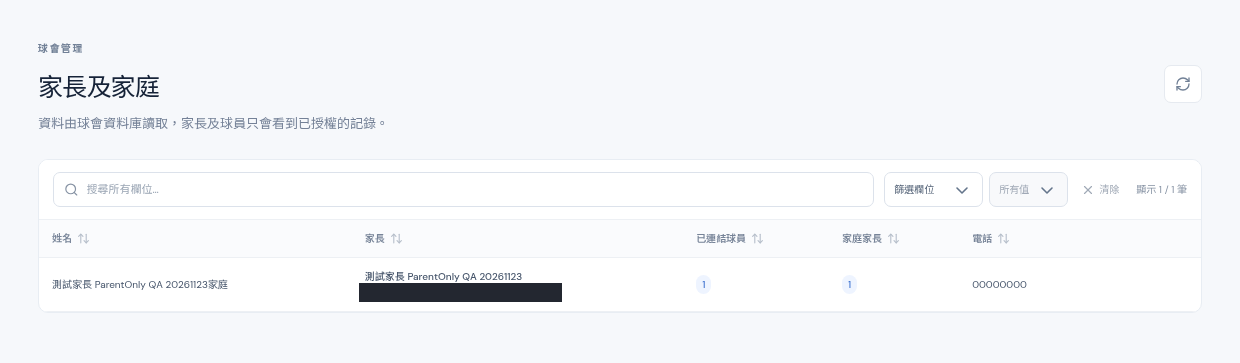
- After you open the page, the heading is Parents and families. The page description is: "Data is read from the club database; parents and players will only see records they are authorised to view."
- The list columns include: Name (the family name), Parent, Linked players, Family parents, and Phone.
- To refresh the screen, select the circular arrow button at the top-right.
- To search, enter a keyword in "Search all fields..", for example a family or parent name.
- To filter, select Filter field to choose a field, then select All values to choose a condition. Select Clear to cancel the filter.
- Select the arrow beside a column name to sort by that column. "Showing × / × records" at the top-right shows the current number of rows.
How to view linked players or parents
- In that family's row, select the number under Linked players to open the list of linked players.
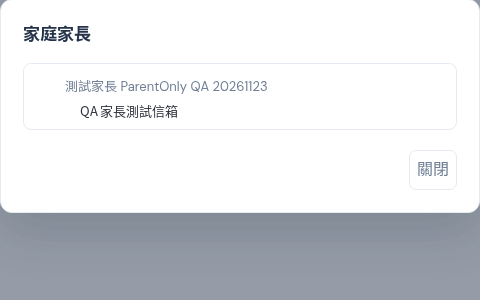
- Select the number under Family parents to open the Family parents window and view parent names and contact emails.
- When you have finished looking, select Close.
What you will see afterwards
You will see the family details you are authorised to view, and the number of linked players and parents. Selecting the row itself does not open an edit screen.
If you need to change details
Parents cannot add, change or delete family and parent details here. To update a name, phone number, email or family members, contact the club.