
View the overview
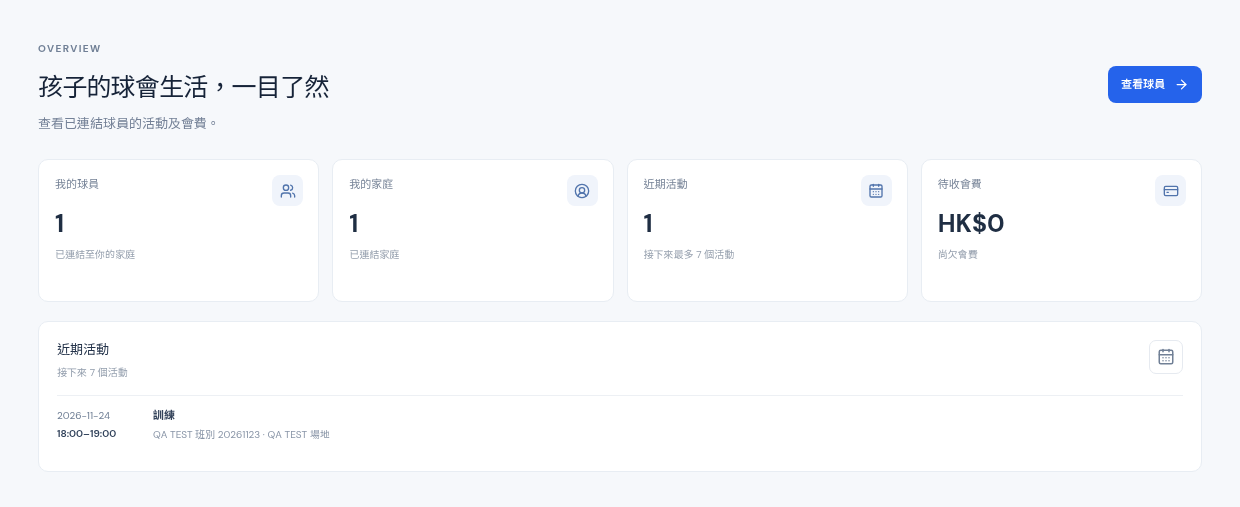
The overview shows a one-page summary of your linked players, families, upcoming activities and fee status.
Where to find this
After you sign in, select Overview in the left-hand menu.
How to view it
- After you select Overview, the heading is Your child's club life at a glance, and the description is "View activities and fees for linked players."
- The four cards at the top show:
- My players: the number of players linked to your family
- My family: the number of linked families
- Upcoming activities: the count of up to the next 7 activities
- Fees receivable: the fee amount currently shown, with an Outstanding fees note
- To go directly to the player list, select View players at the top-right.
- Upcoming activities below lists upcoming activities, including the date, time, type, class or team, and venue.
What you will see afterwards
You can see your family's upcoming activity times, and whether any fees are outstanding. To view the full activity calendar, go to Activities on the left; to view fee details, go to Finance.
If you need to change details
The overview page is for viewing. To change player, family or enrolment details, contact the club.